SFI SYSTEM(w/ Canister Pump Module), Diagnostic DTC:P001001, P002001
| DTC Code | DTC Name |
|---|---|
| P001001 | Camshaft Position "A" Actuator Bank 1 General Electrical Failure |
| P002001 | Camshaft Position "A" Actuator Bank 2 General Electrical Failure |
DESCRIPTION
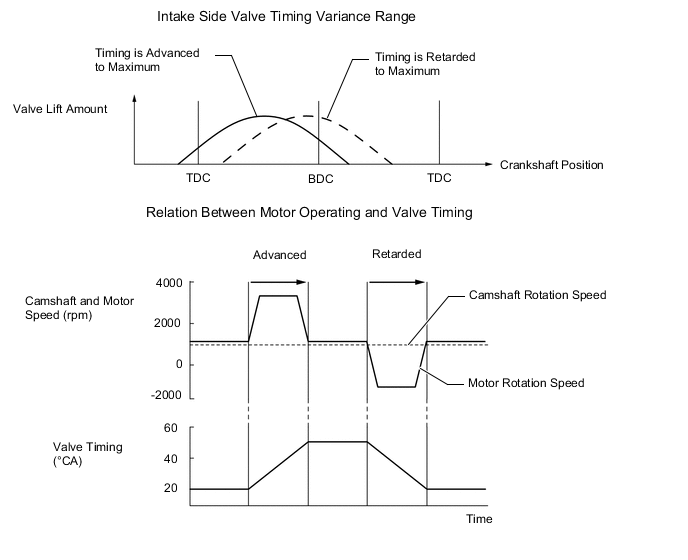
The VVT-iE system adjusts the intake valve timing using a motor. Compared to conventional hydraulic VVT systems, the valve timing can be adjusted within a wider range and can be retarded more when starting the engine. As the VVT-iE system can operate at low engine speeds and when the engine is cold, lower emissions, increased engine power and fuel economy and enhanced startability have been achieved.
-
If the cam timing control motor with EDU assembly is stuck to the advanced side, the valve overlap will be long and affect the internal EGR. This may lead to poor combustion, rough idling or engine stall.
-
If the cam timing control motor with EDU assembly is stuck near the most retarded angle (Atkinson cycle), depending on the vehicle conditions, sufficient intake air may not be obtained, causing a lack of power.
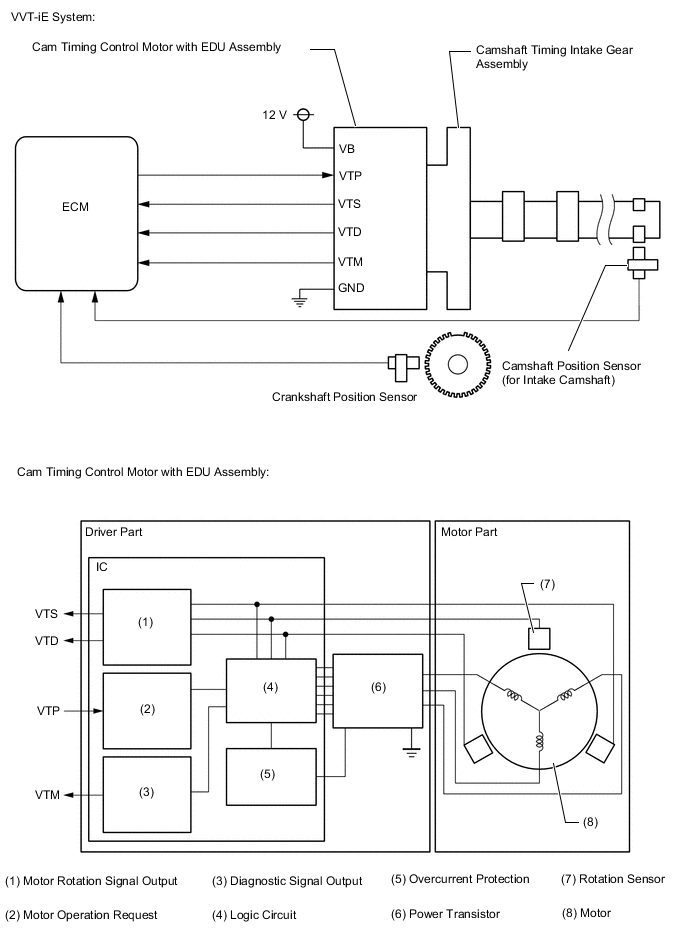
| Part and Terminal Name | Function |
|---|---|
| Cam timing control motor with EDU assembly | Through its electric motor, operates camshaft timing intake gear assembly. Internal driver detects and performs malfunction diagnosis of motor control, motor speed and rotation direction. |
| Camshaft timing intake gear assembly | Changes valve timing by rotating camshaft timing gear. |
| ECM | Outputs target speed and motor rotation direction in response to driving conditions. |
| VB | Power supply (when engine switch on (IG), battery voltage is 12 V or higher) |
| GND | Power supply ground |
| VTP | Inputs motor activation signal from ECM. |
| VTS | Outputs actual motor speed. |
| VTD | Outputs actual rotation direction. |
| VTM | Outputs malfunction diagnosis results as a duty ratio.
|
| DTC No. | Detection Item | DTC Detection Condition | Trouble Area | MIL | Memory | Note |
|---|---|---|---|---|---|---|
| P001001 | Camshaft Position "A" Actuator Bank 1 General Electrical Failure | One of the following conditions is met for 3 seconds or more (1 trip detection logic).
|
|
Comes on | DTC stored | SAE: P0010 |
| P002001 | Camshaft Position "A" Actuator Bank 2 General Electrical Failure | One of the following conditions is met for 3 seconds or more (1 trip detection logic).
|
|
Comes on | DTC stored | SAE: P0020 |
| Vehicle Condition | Fail-Safe |
|---|---|
|
The cam timing control motor with EDU assembly is operated to the most retarded position. |
MONITOR DESCRIPTION
These DTCs are output when an IC overheat malfunction or an overcurrent malfunction is detected in the cam timing control motor with EDU assembly. The cam timing control motor with EDU assembly is equipped with a self-diagnostic function, which is used to output diagnosis signals (VTM) to the ECM. If the ECM receives a motor driver interior malfunction signal, the ECM will illuminate the MIL and store this DTC.
CONFIRMATION DRIVING PATTERN
-
Connect the GTS to the DLC3.
-
Turn the engine switch on (IG).
-
Turn the GTS on.
-
Clear the DTCs (even if no DTCs are stored, perform the clear DTC procedure).
-
Turn the engine switch off and wait for at least 30 seconds.
-
Turn the engine switch on (IG).
-
Turn the GTS on.
-
Start the engine and warm it up (until the engine coolant temperature 75°C (167°F) or higher) with all the accessories switched off [A].
-
Idle the engine for 10 seconds or more [A].
-
Enter the following menus: Powertrain / Engine / Trouble Codes [C].
-
Read the pending DTCs.
Tech Tips
-
If a pending DTC is output, the system is malfunctioning.
-
If a pending DTC is not output, perform the following procedure.
-
-
Enter the following menus: Powertrain / Engine / Utility / All Readiness.
-
Input the DTC: P001001 or P002001.
-
Check the DTC judgment result.
GTS Display Description NORMAL
-
DTC judgment completed
-
System normal
ABNORMAL
-
DTC judgment completed
-
System abnormal
INCOMPLETE
-
DTC judgment not completed
-
Perform driving pattern after confirming DTC enabling conditions
Tech Tips
-
If the judgment result is NORMAL, the system is normal.
-
If the judgment result is ABNORMAL, the system has a malfunction.
-
If the judgment result is INCOMPLETE, perform steps [A] through [C] again.
-
CAUTION / NOTICE / HINT
Tech Tips
-
Read Freeze Frame Data using the GTS. The ECM records vehicle and driving condition information as Freeze Frame Data the moment a DTC is stored. When troubleshooting, Freeze Frame Data can help determine if the vehicle was moving or stationary, if the engine was warmed up or not, if the air fuel ratio was lean or rich, and other data from the time the malfunction occurred.
-
Bank 1 refers to the bank that includes the No. 1 cylinder*.
*: The No. 1 cylinder is the cylinder which is farthest from the transmission.
-
Bank 2 refers to the bank that does not include the No. 1 cylinder.
DTC Suspected Area P001001 Bank 1 P002001 Bank 2
PROCEDURE
-
INSPECT CAMSHAFT TIMING INTAKE GEAR ASSEMBLY
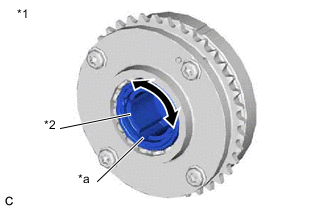
*1 Camshaft Timing Intake Gear Assembly *2 Eccentric Shaft *a Spline
-
Remove the cam timing control motor with EDU assembly.
for bank 1: Click here
for bank 2: Click here
-
Check if the eccentric shaft of the camshaft timing intake gear assembly rotates smoothly.
Note
If the camshaft is at a position where a valve is about to open, the eccentric shaft may become difficult to rotate.
OK Rotates smoothly. Tech Tips
Perform "Inspection After Repair" after replacing the camshaft timing intake gear assembly, or removing or replacing the cam timing control motor with EDU assembly.
Result Proceed to OK NG
OK 
REPLACE CAM TIMING CONTROL MOTOR WITH EDU ASSEMBLY for bank 1: Click here
REPLACE CAM TIMING CONTROL MOTOR WITH EDU ASSEMBLY for bank 2: Click hereNG
REPLACE CAMSHAFT TIMING INTAKE GEAR ASSEMBLY Click here
-